CI/CD
This chapter describes the CI/CD pipelines used in the project. The pipelines automate various tasks such as testing, building, and deploying.
Overview
GitHub Actions are used to manage automated workflows. Below is an overview of the key workflows included in the project:
Behave Pipeline: Runs behave tests and uploads the results.
Codecov Pipeline: Runs unit tests via pytest and uploads the test coverage.

CodeQL Pipeline: Runs CodeQL security analysis on the codebase.

Pytest Pipeline: Runs unit tests via pytest and uploads the results.

mypy Pipeline: Runs mypy checks and uploads the results.

Ruff Pipeline: Runs ruff checks and uploads the results.

ZAP Pipeline: Runs OWASP ZAP security scans on the web application.

Sequence Diagram CI/CD Pipeline
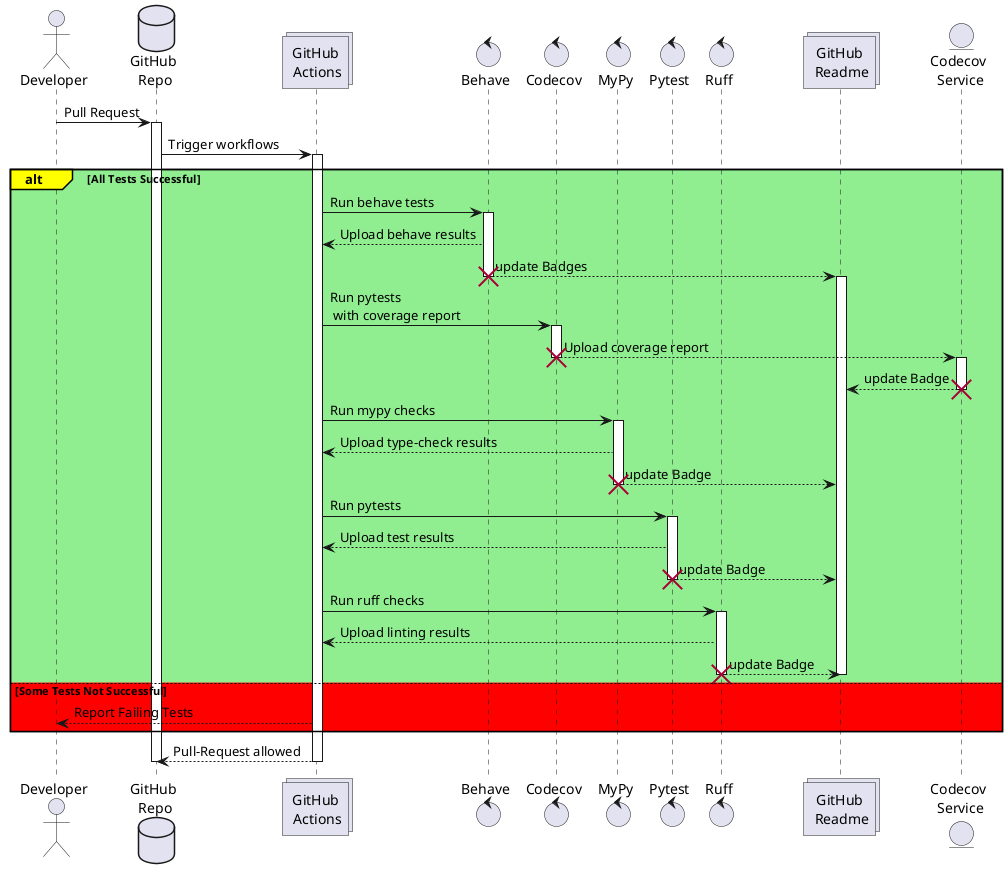
Sequence Diagram of the automatically triggered pipelines
Component Diagram CI/CD Pipeline
![@startuml
package "GitHub" {
[Repository]
[Actions]
}
package "CI/CD Pipelines" {
[Codecov]
[Behave]
[MyPy]
[Pytest]
[Ruff]
}
[Repository] --> [CI/CD Pipelines] : Triggers Pipelines
Codecov --> [Codecov Service] : Upload Coverage
Behave --> [Actions] : Update Badge
[Codecov Service] --> [Actions] : Update Badge
MyPy --> [Actions] : Update Badge
Pytest --> [Actions] : Update Badge
Ruff --> [Actions] : Update Badge
[Actions] --> [Repository] : Display Badges in README
@enduml](../_images/plantuml-de5d095695172c9e1c16ac00a8285deedc5b77f0.png)
Component Diagram of the automatically triggered pipelines
Composite Setup action
Since we are using uv as package manager and the setup is the same everytime, it makes sense to create a separate action that can be used from every other action. The so called “composite action” looks like the following:
name: Setup Environment
description: Checks out code and installs the current uv version and it's dependencies defined inside the pyproject.toml file.
inputs:
  run_migrations:
    description: "Boolean to run the database migrations or not."
    required: false
    default: 'false'
runs:
  using: "composite"
  steps:
    - name: Install and setup uv
      uses: astral-sh/setup-uv@v7  # Sets up `uv` package manager.
      with:
        enable-cache: true  # Caches `uv` installation for faster runs.
        cache-dependency-glob: "uv.lock" # Invalidate cache when the lockfile changes.

    - name: Set up Python
      uses: actions/setup-python@v6  # Sets up Python environment.
      with:
        python-version-file: "pyproject.toml"  # Ensures the correct Python version is used.

    - name: Run database migrations # Resets the database before running tests.
      if: ${{ inputs.run_migrations == 'true' }} # Only run migrations if input is true.
      shell: bash
      run: |
        uv run trustpoint/manage.py reset_db --force --keep-all-migrations
As said, this action sets up the environment by installing uv via Astrals github action
setup-uv and uses a pinned version, as well as caching.
After this, the setup-python action
is called which takes the python version from the pyproject file.
At the time of writing this, that action may be faster than uv’s own action because of GitHubs caching mechanism.
The action ends with maybe running database migrations depending on the switch provided by the input run_migrations.
Behave Pipeline
The following workflow file is a reusable template workflow
because we want to have exactly one result for every feature file executed.
That is to show the progress inside the README.md file which features are working and which do not work just yet.
This workflow template uses a string as an input value which just specifies which feature file to run.
First of all, we checkout the code via actions/checkout.
Then, we are using the previously defined action (see Composite Setup action) to make uv usable inside this workflow.
Having uv activated, the behave action is triggered for the given feature file.
Note that we need to use uv run trustpoint/manage.py behave instead of uv run behave to make Django available for behave.
Once the tests are ran, an artifact with the test reports is uploaded.
name: Behave Tests

# This workflow is designed to be reusable by other workflows via `workflow_call`.
on:
  workflow_call:
    inputs:
      feature_file:
        description: 'Feature file to test'  # The specific feature file to be tested.
        required: true  # This input is mandatory.
        type: string  # The input type is a string.

jobs:
  behave:
    runs-on: ubuntu-latest  # Use the latest Ubuntu runner for compatibility and performance.
    permissions:
      contents: read
    steps:
      - name: Checkout Code
        uses: actions/checkout@v6  # Ensures the repository code is available.

      - name: Setup uv environment
        uses: ./.github/actions/setup-uv-action  # Call the reusable setup step.
        with:
          run_migrations: true  # Enable database migrations.

      - name: Run Behave Tests and Generate HTML Report for ${{ inputs.feature_file }}.feature
        run: |
          uv run trustpoint/manage.py behave \
          --format behave_html_pretty_formatter:PrettyHTMLFormatter \
          --outfile behave-report.html \
          trustpoint/features/${{ inputs.feature_file }}.feature

      - name: Upload Test Report
        uses: actions/upload-artifact@v7  # Uploads the test report for review.
        if: always()  # Ensures the report is uploaded even if tests fail.
        with:
          name: ${{ inputs.feature_file }}-html-report  # Name report based on the feature file tested.
          path: behave-report.html  # Ensure this file is generated correctly before uploading.
We provide an example on how to use this workflow below:
name: R_013

on:
  pull_request:
  push:
    branches:
      - main

jobs:
  test:
    uses: ./.github/workflows/behave-test-template.yml
    permissions:
      contents: read
    with:
      feature_file: R_013_remote_credential_download
Codecov Pipeline
We are using Codecov for analyzing our pytest code coverage and showing this with a badge. This workflow is also setting up uv as in Composite Setup action and using it to run pytest with a coverage report which will be uploaded to codecov in the next step.
name: Codecov upload

# Trigger this workflow on pull requests to ensure tests are executed before merging.
on:
  pull_request:
  push:
    branches:
      - main

jobs:
  codecov-upload:
    runs-on: ubuntu-latest # Use the latest Ubuntu runner for compatibility and performance.
    permissions:
      contents: read
    steps:
      - name: Checkout Code
        uses: actions/checkout@v6  # Ensures the repository code is available.

      - name: Setup uv environment
        uses: ./.github/actions/setup-uv-action  # Call the reusable setup step.
        with:
          run_migrations: true  # Enable database migrations.

      - name: Run Pytest with Coverage
        run: uv run pytest --cov=trustpoint --cov-report=xml --junitxml=junit.xml -o junit_family=legacy trustpoint/

      - name: Upload coverage to Codecov
        uses: codecov/codecov-action@v5
        with:
          token: ${{ secrets.CODECOV_TOKEN }}
          fail_ci_if_error: true

      - name: Upload test results to Codecov
        if: ${{ !cancelled() }}
        uses: codecov/test-results-action@v1
        with:
          token: ${{ secrets.CODECOV_TOKEN }}
          file: ./junit.xml
Pytest Pipeline
This pipeline/workflow is kind of the same as the one above except from not running the coverage reports and therefore also not uploading them. Here, we use a git flavored markdown report for printing the report nicely to the job summary. After this, there is the full report uploaded first and lastly, if one or more tests fail, we add a comment to the current pull request.
name: Pytest

# Trigger this workflow on pull requests to ensure tests are executed before merging.
on:
  pull_request:
  push:
    branches:
      - main

jobs:
  pytest:
    runs-on: ubuntu-latest  # Use the latest Ubuntu runner for compatibility and performance.

    permissions:
      contents: read  # Grants read access to repository contents.
      pull-requests: write  # Allows posting test reports as comments on pull requests.

    steps:
      - name: Checkout Code
        uses: actions/checkout@v6  # Ensures the repository code is available.

      - name: Setup uv environment
        uses: ./.github/actions/setup-uv-action  # Call the reusable setup step.
        with:
          run_migrations: true  # Enable database migrations.

      - name: Run Pytest and create reports
        run: |
          mkdir -p reports
          uv run pytest \
          --md-report-flavor github \
          --md-report-color never \
          --html=reports/pytest-report.html \
          --junitxml=reports/junit-report.xml \
          trustpoint/

      - name: Display Summary in GitHub Actions even if tests fail
        if: always()  # Ensures this step runs even if pytest fails.
        run: |
          echo "<details><summary>Pytest Report</summary>" >> $GITHUB_STEP_SUMMARY
          echo "" >> $GITHUB_STEP_SUMMARY
          cat "md-report.md" >> $GITHUB_STEP_SUMMARY
          echo "" >> $GITHUB_STEP_SUMMARY
          echo "</details>" >> $GITHUB_STEP_SUMMARY

      - name: Upload Test Reports even if tests fail
        uses: actions/upload-artifact@v7  # Uploads reports for review.
        if: always()  # Ensures this step runs even if pytest fails.
        with:
          name: pytest-reports
          path: reports/

      - name: Render the report to the PR
        uses: marocchino/sticky-pull-request-comment@v2  # Posts test results as a comment on PRs.
        if: always()  # Always runs.
        with:
          header: test-report
          recreate: true  # Replaces previous test reports to keep PR comments clean.
          path: md-report.md  # Posts the markdown test report in the PR.
mypy Pipeline
We use mypy for static type checking in python. This pipeline is actually really short because it just sets up uv from Composite Setup action and then runs mypy.
name: MyPy

# Trigger this workflow on pull requests, ensuring type checks are performed before merging.
on:
  pull_request:
  push:
    branches:
      - main
    tags:
      - 'v*'

jobs:
  mypy:
    runs-on: ubuntu-latest # Use the latest Ubuntu runner for compatibility and performance.
    permissions:
      contents: read
    steps:
      - name: Checkout Code
        uses: actions/checkout@v6  # Ensures the repository code is available.

      - name: Setup uv environment
        uses: ./.github/actions/setup-uv-action  # Call the reusable setup step.

      - name: Run MyPy
        run: uv run mypy . # Runs MyPy type checker using `uv` package manager.
Ruff Pipeline
Also, the ruff action is nearly as short as the mypy Pipeline. The only difference is that we now run ruff and upload the report if there are any errors.
name: Ruff

# Trigger this workflow on pull requests to ensure tests are executed before merging.
on:
  pull_request:
  push:
    branches:
      - main
    tags:
      - 'v*'

jobs:
  ruff:
    runs-on: ubuntu-latest  # Use the latest Ubuntu runner for compatibility and performance.
    permissions:
      contents: read

    steps:
      - name: Checkout Code
        uses: actions/checkout@v6  # Ensures the repository code is available.

      - name: Setup uv environment
        uses: ./.github/actions/setup-uv-action  # Call the reusable setup step.

      - name: Run Ruff Linting
        run: uv run ruff check .
CodeQL Pipeline
We use CodeQL for automated security analysis of the codebase. This pipeline runs CodeQL analysis on multiple languages including Python, JavaScript/TypeScript, and GitHub Actions. It performs static analysis to identify potential security vulnerabilities and code quality issues. The analysis is configured with a custom CodeQL configuration file and runs on a schedule as well as on pushes and pull requests to the main branch.
name: "CodeQL Advanced"

on:
  push:
    branches: [ "main" ]
  pull_request:
    branches: [ "main" ]
  schedule:
    - cron: '44 7 * * 2'

jobs:
  analyze:
    name: Analyze (${{ matrix.language }})
    # Runner size impacts CodeQL analysis time. To learn more, please see:
    #   - https://gh.io/recommended-hardware-resources-for-running-codeql
    #   - https://gh.io/supported-runners-and-hardware-resources
    #   - https://gh.io/using-larger-runners (GitHub.com only)
    # Consider using larger runners or machines with greater resources for possible analysis time improvements.
    runs-on: ${{ (matrix.language == 'swift' && 'macos-latest') || 'ubuntu-latest' }}
    permissions:
      # required for all workflows
      security-events: write

      # required to fetch internal or private CodeQL packs
      packages: read

      # only required for workflows in private repositories
      actions: read
      contents: read

    strategy:
      fail-fast: false
      matrix:
        include:
        - language: actions
          build-mode: none
        - language: javascript-typescript
          build-mode: none
        - language: python
          build-mode: none
        # CodeQL supports the following values keywords for 'language': 'actions', 'c-cpp', 'csharp', 'go', 'java-kotlin', 'javascript-typescript', 'python', 'ruby', 'rust', 'swift'
        # Use `c-cpp` to analyze code written in C, C++ or both
        # Use 'java-kotlin' to analyze code written in Java, Kotlin or both
        # Use 'javascript-typescript' to analyze code written in JavaScript, TypeScript or both
        # To learn more about changing the languages that are analyzed or customizing the build mode for your analysis,
        # see https://docs.github.com/en/code-security/code-scanning/creating-an-advanced-setup-for-code-scanning/customizing-your-advanced-setup-for-code-scanning.
        # If you are analyzing a compiled language, you can modify the 'build-mode' for that language to customize how
        # your codebase is analyzed, see https://docs.github.com/en/code-security/code-scanning/creating-an-advanced-setup-for-code-scanning/codeql-code-scanning-for-compiled-languages
    steps:
    - name: Checkout repository
      uses: actions/checkout@v6

    # Add any setup steps before running the `github/codeql-action/init` action.
    # This includes steps like installing compilers or runtimes (`actions/setup-node`
    # or others). This is typically only required for manual builds.
    # - name: Setup runtime (example)
    #   uses: actions/setup-example@v1

    # Initializes the CodeQL tools for scanning.
    - name: Initialize CodeQL
      uses: github/codeql-action/init@v4
      with:
        languages: ${{ matrix.language }}
        build-mode: ${{ matrix.build-mode }}
        config-file: ./.github/codeql/codeql-config.yml
        # If you wish to specify custom queries, you can do so here or in a config file.
        # By default, queries listed here will override any specified in a config file.
        # Prefix the list here with "+" to use these queries and those in the config file.

        # For more details on CodeQL's query packs, refer to: https://docs.github.com/en/code-security/code-scanning/automatically-scanning-your-code-for-vulnerabilities-and-errors/configuring-code-scanning#using-queries-in-ql-packs
        # queries: security-extended,security-and-quality

    # If the analyze step fails for one of the languages you are analyzing with
    # "We were unable to automatically build your code", modify the matrix above
    # to set the build mode to "manual" for that language. Then modify this step
    # to build your code.
    # ℹ️ Command-line programs to run using the OS shell.
    # 📚 See https://docs.github.com/en/actions/using-workflows/workflow-syntax-for-github-actions#jobsjob_idstepsrun
    - name: Run manual build steps
      if: matrix.build-mode == 'manual'
      shell: bash
      run: |
        echo 'If you are using a "manual" build mode for one or more of the' \
          'languages you are analyzing, replace this with the commands to build' \
          'your code, for example:'
        echo '  make bootstrap'
        echo '  make release'
        exit 1

    - name: Perform CodeQL Analysis
      uses: github/codeql-action/analyze@v4
      with:
        category: "/language:${{matrix.language}}"
ZAP Pipeline
We use OWASP ZAP (Zed Attack Proxy) for automated security scanning of the web application. This pipeline performs baseline security scans on both HTTP and HTTPS endpoints of the running Trustpoint application. It starts the application using Docker Compose, runs ZAP scans on ports 80 (HTTP) and 443 (HTTPS), and uploads the scan reports as artifacts. The pipeline fails if high or medium severity issues are found, while low severity issues are reported as warnings.
name: ZAP Baseline Scan

on:
  push:
    branches: [ "main" ]
  pull_request:
    branches: [ "main" ]
  workflow_dispatch:
  release:
    types: [published]

jobs:
  zap-baseline:
    runs-on: ubuntu-latest
    permissions:
      contents: read
      actions: read

    steps:
      - name: Checkout Code
        uses: actions/checkout@v6

      - name: Start Trustpoint via docker-compose
        run: |
          docker compose -f docker-compose.yml up -d
          # give the app time to start
          sleep 60

      - name: OWASP ZAP Baseline Scan (HTTP)
        uses: zaproxy/action-baseline@v0.15.0
        continue-on-error: true
        id: zap-scan-http
        with:
          target: "http://localhost:80"
          fail_action: false
          cmd_options: "-a"
          allow_issue_writing: false

      - name: Rename HTTP Reports
        if: always()
        run: |
          mv report_json.json report_http_json.json || true
          mv report_md.md report_http_md.md || true
          mv report_html.html report_http_html.html || true

      - name: OWASP ZAP Baseline Scan (HTTPS)
        uses: zaproxy/action-baseline@v0.15.0
        continue-on-error: true
        id: zap-scan-https
        with:
          target: "https://localhost:443"
          fail_action: false
          cmd_options: "-a"
          allow_issue_writing: false

      - name: Rename HTTPS Reports
        if: always()
        run: |
          mv report_json.json report_https_json.json || true
          mv report_md.md report_https_md.md || true
          mv report_html.html report_https_html.html || true

      - name: Upload ZAP Scan Reports
        uses: actions/upload-artifact@v7
        if: always()
        with:
          name: zap-reports
          path: |
            report_http_json.json
            report_http_md.md
            report_http_html.html
            report_https_json.json
            report_https_md.md
            report_https_html.html
          retention-days: 30

      - name: Check ZAP Scan Results
        if: always()
        run: |
          TOTAL_WARN=0
          TOTAL_FAIL=0

          # Check HTTP scan results
          if [ -f report_http_md.md ]; then
            HTTP_WARN=$(grep -o "WARN-NEW" report_http_md.md | wc -l || echo "0")
            HTTP_FAIL=$(grep -o "FAIL-NEW" report_http_md.md | wc -l || echo "0")
            echo "HTTP Scan Results:"
            echo "  Warnings: $HTTP_WARN"
            echo "  Failures: $HTTP_FAIL"
            TOTAL_WARN=$((TOTAL_WARN + HTTP_WARN))
            TOTAL_FAIL=$((TOTAL_FAIL + HTTP_FAIL))
          fi

          # Check HTTPS scan results
          if [ -f report_https_md.md ]; then
            HTTPS_WARN=$(grep -o "WARN-NEW" report_https_md.md | wc -l || echo "0")
            HTTPS_FAIL=$(grep -o "FAIL-NEW" report_https_md.md | wc -l || echo "0")
            echo "HTTPS Scan Results:"
            echo "  Warnings: $HTTPS_WARN"
            echo "  Failures: $HTTPS_FAIL"
            TOTAL_WARN=$((TOTAL_WARN + HTTPS_WARN))
            TOTAL_FAIL=$((TOTAL_FAIL + HTTPS_FAIL))
          fi

          echo ""
          echo "Total Results:"
          echo "  Warnings: $TOTAL_WARN"
          echo "  Failures: $TOTAL_FAIL"

          if [ "$TOTAL_FAIL" -gt 0 ]; then
            echo "::error::ZAP found $TOTAL_FAIL high/medium severity issues across HTTP and HTTPS"
            exit 1
          elif [ "$TOTAL_WARN" -gt 0 ]; then
            echo "::warning::ZAP found $TOTAL_WARN warnings (low severity) across HTTP and HTTPS"
          fi

      - name: Cleanup
        if: always()
        run: docker compose -f docker-compose.yml down