Database Encryption in Trustpoint
Overview
Trustpoint uses the application-secret subsystem to protect sensitive database fields such as EST passwords, CMP shared secrets, TLS private keys, and operator-enabled protected imported keys. Field encryption uses AES-256-GCM. The Data Encryption Key (DEK) can be protected either by Trustpoint’s software app-secret backend or by a PKCS#11-backed Key Encryption Key (KEK).
Key Management Architecture
The encryption system follows this key structure:
Data Encryption Key (DEK) - A 256-bit key used for field encryption
Key Encryption Key (KEK) - Optional PKCS#11 AES key used to protect the DEK
Field Encryption - Individual database fields encrypted using the DEK with AES-256-GCM
Key Generation Process
DEK Protection Modes
Trustpoint supports two application-secret backend modes:
- Software app-secret backend
The DEK is stored by Trustpoint’s software app-secret configuration. This mode is useful for development, demo, and PKCS#11 tokens that only support signing/key-generation operations.
- PKCS#11 app-secret backend
Trustpoint generates or locates a non-extractable AES KEK on the PKCS#11 token and stores only the protected DEK in the database. The token must support the standard AES flows that Trustpoint probes during setup.
PKCS#11 KEK Handling
When PKCS#11 application-secret protection is enabled:
Trustpoint opens a session with the configured PKCS#11 token
The application-secret KEK is created or resolved on that token
The KEK is marked non-extractable where the provider supports those attributes
Trustpoint protects the DEK using supported AES key-wrap or AES encryption/decryption mechanisms
The protected DEK is stored in the application-secret PKCS#11 config row
Runtime Key Management
Container Startup
When the Trustpoint container starts:
The system attempts to retrieve the cached DEK from Django’s cache
If not cached, it resolves the configured app-secret backend:
software backend: load the configured software DEK
PKCS#11 backend: recover the DEK through the token-backed KEK
The decrypted DEK is cached in-process for field encryption/decryption
The DEK remains in memory cache for the process lifetime.
DEK Caching Strategy
Cache Key: application-secret backend specific
Cache Duration: Indefinite (
Nonetimeout)Cache Backend: Django’s configured cache
Security: DEK can be manually cleared using the app-secret cache clearing helper
Database Field Encryption
Encrypted Field Types
Two field types are provided for database encryption:
EncryptedCharField- For short sensitive strings (passwords, secrets)EncryptedTextField- For longer sensitive text content
Encryption Process
When saving data to encrypted fields:
Retrieve DEK: Get the cached DEK from the configured app-secret backend
Generate Nonce: Create a random 12-byte nonce for GCM mode
Encryption: Encrypt using AES-256-GCM with the DEK and nonce
Encoding: Store the encoded ciphertext with the Trustpoint ciphertext prefix
Decryption Process
When reading data from encrypted fields:
Retrieve DEK: Get the cached DEK from the configured app-secret backend
Decode: Base64 decode the stored value
Extract Components: Separate nonce (first 12 bytes), authentication tag (next 16 bytes), and ciphertext
Decryption: Decrypt using AES-256-GCM and verify authentication tag
Return: Return the original plaintext
Protected Data Types
The following sensitive fields use database encryption:
Device Model Fields
est_password(EncryptedCharField, max_length=128) - EST authentication passwordscmp_shared_secret(EncryptedCharField, max_length=128) - CMP protocol shared secrets
Credential Model Fields
private_key(EncryptedCharField, max_length=65536) - PEM-encoded private keys for credentials created in Trustpoint
Crypto Managed-Key Fields
encrypted_private_key_pkcs8_der_b64- PKCS#8 DER material for protected imported keys, encrypted before it is stored
Protected imported keys are only available when Allow imported private keys is enabled under Management > Settings > Security and the instance uses both a PKCS#11 crypto backend and PKCS#11-backed application-secret protection. They are not imported into the HSM token.
UML Sequence Diagram
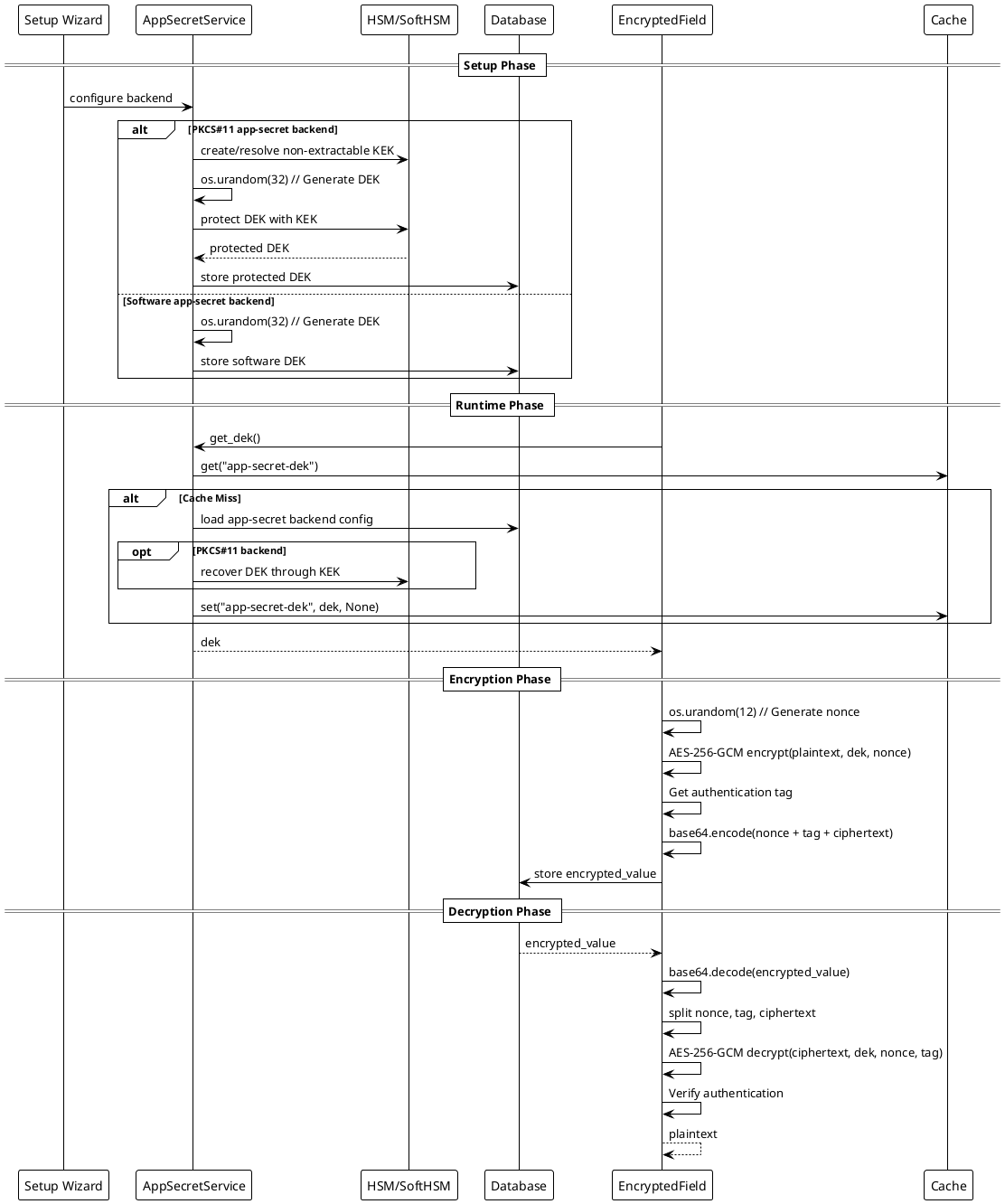
Encryption Implementation Details
Cryptographic Algorithm
The system uses AES-256-GCM (Advanced Encryption Standard with 256-bit keys in Galois/Counter Mode) for field-level encryption:
Algorithm: AES-256
Mode: GCM (Galois/Counter Mode)
Key Size: 256 bits (32 bytes)
Nonce Size: 96 bits (12 bytes)
Authentication Tag: 128 bits (16 bytes)
Padding: Not required (GCM is a stream cipher mode)
Security Properties
- Nonce
12-byte random nonce generated for each encryption operation using
os.urandom(12)Ensures identical plaintexts produce different ciphertexts
- Authentication
Built-in authentication prevents tampering
128-bit authentication tag provides strong integrity protection
Eliminates padding oracle attacks
- Key Management
256-bit DEK provides strong cryptographic security
Optional PKCS#11 KEK protects the DEK when HSM-backed application-secret protection is enabled
Software app-secret protection is available for development, demo, and signing-only PKCS#11 tokens
Field Encryption/Decryption Workflow
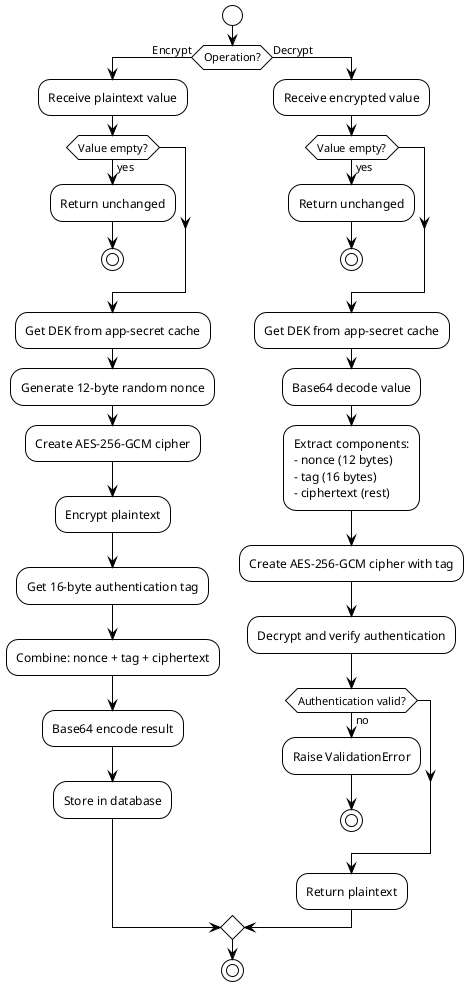
Error Handling and Recovery
Corrupted DEK
If the protected DEK becomes corrupted:
The system detects invalid protected data during DEK recovery
Error messages indicate potential data corruption
Manual recovery or reconfiguration of the app-secret backend will be required
Warning: Regenerating the DEK will make all previously encrypted data unrecoverable
Key Rotation
Currently, key rotation is not implemented. Future versions may include:
Automated KEK rotation with dual-key support
DEK re-wrapping with new KEKs
Gradual field re-encryption with new DEKs